How ER Clinics Fax EMTALA Transfer Forms Without Acceptance Delays

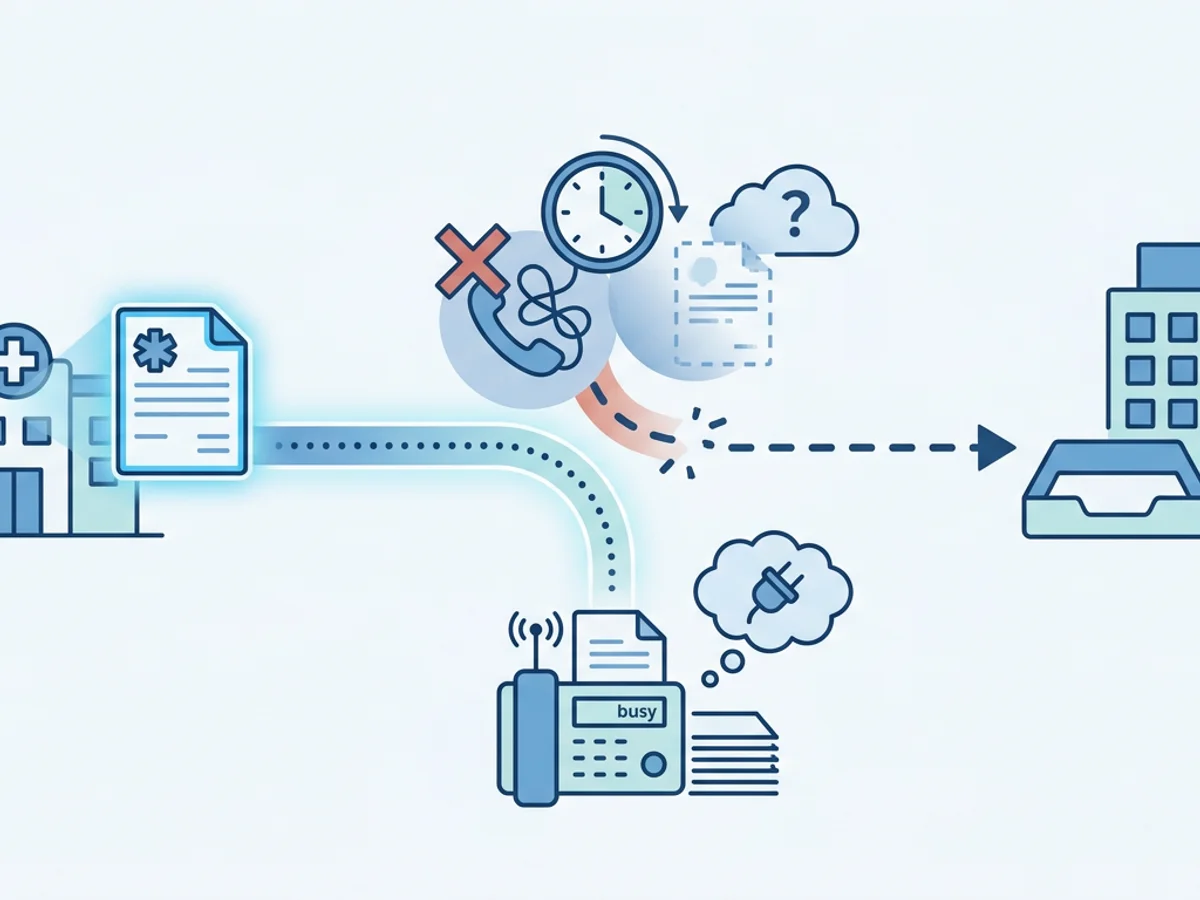
A patient needs a higher level of care. The receiving facility has agreed to review the case, the physician-to-physician conversation is underway, and transport is waiting for paperwork. Then the transfer stalls because the EMTALA packet cannot get through: the unit fax machine is tied up, the number was dialed wrong, the confirmation page is missing, or the transfer center says they never received the form.
For an emergency department, freestanding ER, or urgent receiving clinic operating under EMTALA transfer requirements, that kind of paperwork delay is not just frustrating. It can affect bed assignment, ambulance dispatch, specialist review, and the receiving hospital’s ability to formally accept the transfer.
Fax is still a common part of that workflow because many hospitals, transfer centers, and specialty units continue to rely on faxed transfer documentation. The practical question is not “Why fax?” but “How do we fax the right documents quickly, clearly, and with proof of delivery when every minute matters?”
This guide walks through a realistic process for using browser-based faxing to send EMTALA transfer forms without creating avoidable acceptance delays, while staying honest about what an online fax service can and cannot do.
Why EMTALA Transfer Faxing Gets Delayed at the Worst Possible Time
Transfer paperwork tends to fail at the handoff points. The clinical team may have done everything right: stabilized the patient within the facility’s capability, contacted the appropriate receiving provider, documented the risks and benefits of transfer, and prepared the patient for transport. But administrative friction can still slow the acceptance process.
Common delay points include:
- One shared fax machine for the whole department. Registration, imaging, outside records requests, and transfer paperwork may all compete for the same device.
- Pages sent in the wrong order. A transfer center may need the physician certification first, while the packet begins with insurance, demographics, or a blank cover sheet.
- Incomplete forms. Missing physician signature, time of certification, patient condition, mode of transport, or receiving facility details can trigger a callback.
- Unclear fax confirmation. A printed “OK” receipt may be misplaced, or staff may not know whether all pages transmitted.
- After-hours staffing gaps. The person who usually handles faxing may not be available during nights, weekends, or surge periods.
- Workstation bottlenecks. If the form is scanned to one computer but the fax machine is across the department, staff waste time walking, printing, rescanning, and redialing.
In a real transfer scenario, those small gaps compound. For example, a rural ER has a patient with a suspected intracranial bleed. The receiving neurosurgery center requests the EMTALA certification, face sheet, medication list, vitals, and CT report before assigning a bed. The nurse prints the packet, waits behind two incoming record requests at the fax machine, sends it, and later learns only seven of twelve pages arrived. Now the packet has to be resent while EMS remains on standby.
A cleaner workflow reduces those failure points. It does not replace the clinical acceptance process, and it does not guarantee that a receiving facility will accept a patient faster. But it helps ensure the documents needed for acceptance review are sent promptly and with a delivery receipt.
Build a Transfer Fax Packet That Receiving Facilities Can Act On
Speed matters, but speed without completeness creates rework. The goal is to send a packet that lets the transfer center, accepting physician, house supervisor, or specialty unit identify the patient, understand the clinical situation, verify the transfer request, and proceed with acceptance steps.
A practical EMTALA transfer fax packet often includes some combination of the following, depending on facility policy and the receiving hospital’s request:
Professional fax cover page
Include the receiving facility name, department or transfer center, fax number, sending facility, callback number, patient initials or other permitted identifier under your policy, page count, and urgency. A clear cover page helps prevent misrouting and makes callbacks faster.Patient demographic or face sheet
This helps the receiving facility match the request to the correct patient and prepare registration or bed placement.EMTALA transfer certification form
This is often the key document. Make sure required fields are complete before sending: physician certification, risks and benefits, patient condition, reason for transfer, receiving facility/provider information if available, and date/time.Physician or provider notes relevant to transfer
Do not bury the receiving team in every chart entry if they requested only the transfer summary and recent clinical notes. Too many pages can slow review, especially when a specific service line is waiting for a concise picture.Vitals, medication list, allergies, labs, and imaging reports
Include the most recent and most relevant results. If imaging will be pushed electronically or sent on disc, state that on the cover page or transfer note.Nursing transfer summary and transport details
Include mode of transport, monitoring needs, oxygen, IV access, isolation precautions, and any drips or equipment required during transfer.
Before faxing, assign one person to do a quick packet check. This can be as simple as reading the receiving facility’s request aloud and confirming each item is present. In high-acuity situations, a 30-second check can prevent a 15-minute resend.
It also helps to standardize file names before upload. For example:
Smith_J_EMTALA_Certification.pdfSmith_J_FaceSheet.pdfSmith_J_Labs_CTReport.pdfSmith_J_TransferSummary.pdf
Browser-based faxing services that accept PDF, Word, and image uploads can fit into this workflow because staff can fax the completed packet from a phone, tablet, or computer once the documents are ready. If your documents are already digital, you may avoid printing and rescanning altogether.
Using Browser-Based Faxing When the Department Fax Machine Is the Bottleneck
When the physical fax machine is busy, out of toner, offline, or located away from the clinical team, online faxing can provide a practical backup path. BestFax.com lets users send and receive faxes from a web browser on a phone, tablet, or computer, so staff are not tied to one machine in one corner of the department.
Here is what a typical transfer fax workflow might look like:
Scenario: a freestanding ER transferring a septic patient to an ICU
The accepting hospital’s transfer center asks for the EMTALA form, recent vitals, medication administration record, labs, and a short clinical summary. The charge nurse exports the completed forms as PDFs from the facility’s system, adds the lab report as a PDF, and uploads the packet through the fax service in Chrome at the nurses’ station. Another nurse confirms the destination fax number with the transfer center by phone before the send button is clicked.
The team includes a professional cover page with the transfer center’s name, direct callback number, patient reference details according to internal policy, and the total page count. After sending, they save the fax confirmation or delivery receipt to the transfer record according to the facility’s documentation procedure.
That workflow helps in a few practical ways:
- Staff can fax from the device already in use, instead of waiting at a shared machine.
- Digital documents stay digital, reducing print-scan quality problems.
- A cover page and page count make it easier for the receiver to spot missing pages.
- A delivery receipt gives the sending team a documented transmission result.
This is not a substitute for calling the receiving facility. For EMTALA transfers, faxing should support the communication loop, not replace it. The safest workflow is usually: confirm the correct fax number, send the packet, verify receipt when needed, and document the outcome.
One important note for healthcare settings: the service uses TLS encryption for fax transmissions, but it does not offer a BAA or healthcare-specific compliance certification. Facilities should evaluate their own policies, legal obligations, and risk requirements before using any outside communication tool for patient-related documents.
Prevent Acceptance Delays With a “Fax-and-Verify” Checklist
A transfer can stall even after a successful send if the receiving facility cannot route the packet internally. The simplest way to reduce that risk is to treat faxing as a closed-loop task, not a one-way send.
Use a checklist like this when faxing EMTALA transfer forms:
Before sending
- Confirm the destination fax number directly with the transfer center, receiving unit, or accepting office.
- Ask whether the receiving facility wants one full packet or specific documents first.
- Confirm who should be listed on the cover page: transfer center, ED charge nurse, house supervisor, specialty service, or admissions office.
- Check that the EMTALA certification form is signed and dated as required by your facility policy.
- Count the pages and make sure the cover page reflects the correct total.
- Put the most important acceptance documents near the front of the packet.
During sending
- Upload clear files in supported formats, such as PDF, Word, or image files.
- Avoid low-quality photos if possible; use clear scans or exported PDFs.
- Send to the verified number, not an old number saved in a binder or copied from a prior case.
- Keep the sender available for callbacks while the fax is transmitting.
After sending
- Review the confirmation or delivery receipt.
- Save or print the receipt according to facility procedure.
- Call the receiving facility if acceptance depends on immediate review.
- Document the time sent, number used, recipient contacted, and any resend requests.
- If the receiver reports missing pages, resend only what is needed unless they request the full packet again.
This process may sound basic, but basic steps are what prevent many delays. A receiving transfer center may be coordinating multiple cases, beds, physicians, and transport teams at once. A clean cover page, correct fax number, and prompt verification call can make your packet easier to find and act on.
Practical Tips for Nights, Surge Periods, and Multi-Site Coverage
Transfer delays are more likely when staffing is thin or patient volume spikes. Online faxing is most useful when the workflow has been planned before the emergency occurs.
If your clinic or ER group has multiple locations, consider developing a standard transfer fax playbook. It might include approved document order, internal review steps, common receiving facility fax numbers, callback scripts, and instructions for saving confirmation receipts. The goal is not to create more paperwork. It is to make the transfer process predictable when the department is under pressure.
For example, a small ER network may decide that every transfer packet begins with:
- Cover page
- EMTALA transfer certification
- Face sheet
- ED provider note or transfer summary
- Vitals and nursing summary
- Labs and imaging reports
- Medication list and allergies
If a receiving facility asks for a different order, staff can adjust. But a default order prevents every shift from inventing its own process.
You can also reduce delays by preparing for common technical issues:
- Keep a current list of receiving facility transfer center fax numbers, but still verify by phone before sending.
- Train more than one role to send the fax packet, so the process does not depend on a single clerk or nurse.
- Make sure staff know where digital transfer forms are stored and how to export them as PDFs.
- Use readable file names so the sender does not accidentally upload the wrong document.
- Decide in advance where delivery receipts should be saved in the patient transfer record.
BestFax.com works in Safari, Chrome, Firefox, and Edge with no app download required, which can be helpful when staff are using different devices across shifts or locations. Pricing is straightforward: $4.95 for a one-time fax or $10/month for a subscription. There is no free trial, so facilities should choose based on their expected use and internal approval process.
Just as important, set expectations with the team. Browser-based faxing can help with transmission speed, access, and receipts. It does not complete clinical documentation, obtain physician acceptance, arrange transport, validate EMTALA compliance, or replace facility policies. Those responsibilities remain with the transferring facility and its clinical leadership.
What a No-Delay Transfer Fax Habit Looks Like
The fastest fax workflow is not rushed; it is disciplined. The team knows which forms matter, sends them in a logical order, verifies the destination, and keeps proof of delivery. If the receiver needs more information, the sender can respond quickly because the documents are already organized.
A strong EMTALA transfer fax habit looks like this:
- The transfer center’s fax number is verified before sending.
- The EMTALA certification is complete before it leaves the facility.
- The cover page clearly identifies the transfer request and callback number.
- The packet is sent from an available browser-based fax tool when the machine is unavailable or inefficient.
- The delivery receipt is reviewed and retained.
- The receiving facility is contacted when immediate acceptance review is needed.
That combination helps reduce avoidable back-and-forth. In emergency care, no fax tool can remove the complexity of interfacility transfers. But a reliable, browser-accessible fax process can keep paperwork from becoming the reason an otherwise appropriate transfer waits.
Send your first fax at BestFax.com.
Related Posts
How Mobile X-Ray Providers Can Fax STAT Reports to Nursing Homes Without Delays
Practical ways mobile X-ray providers can fax STAT reports to nursing homes faster, with fewer routing delays and clearer delivery tracking.
How Sports Medicine Clinics Fax MRI Orders Without Authorization Delays
Practical ways sports medicine clinics can fax MRI orders with cleaner packets, better routing, delivery receipts, and fewer authorization delays.
How Vision Clinics Fax Eyeglass Prescriptions to Labs Without Order Delays
Practical ways vision clinics can fax eyeglass prescriptions to labs with fewer missing pages, callbacks, and order delays.