How Prosthetics Clinics Can Fax Detailed Written Orders Without Medicare Delays

A patient is ready for a definitive prosthesis, the practitioner has completed the evaluation, the physician has signed off, and the clinic is trying to move the case forward. Then the order gets stuck.
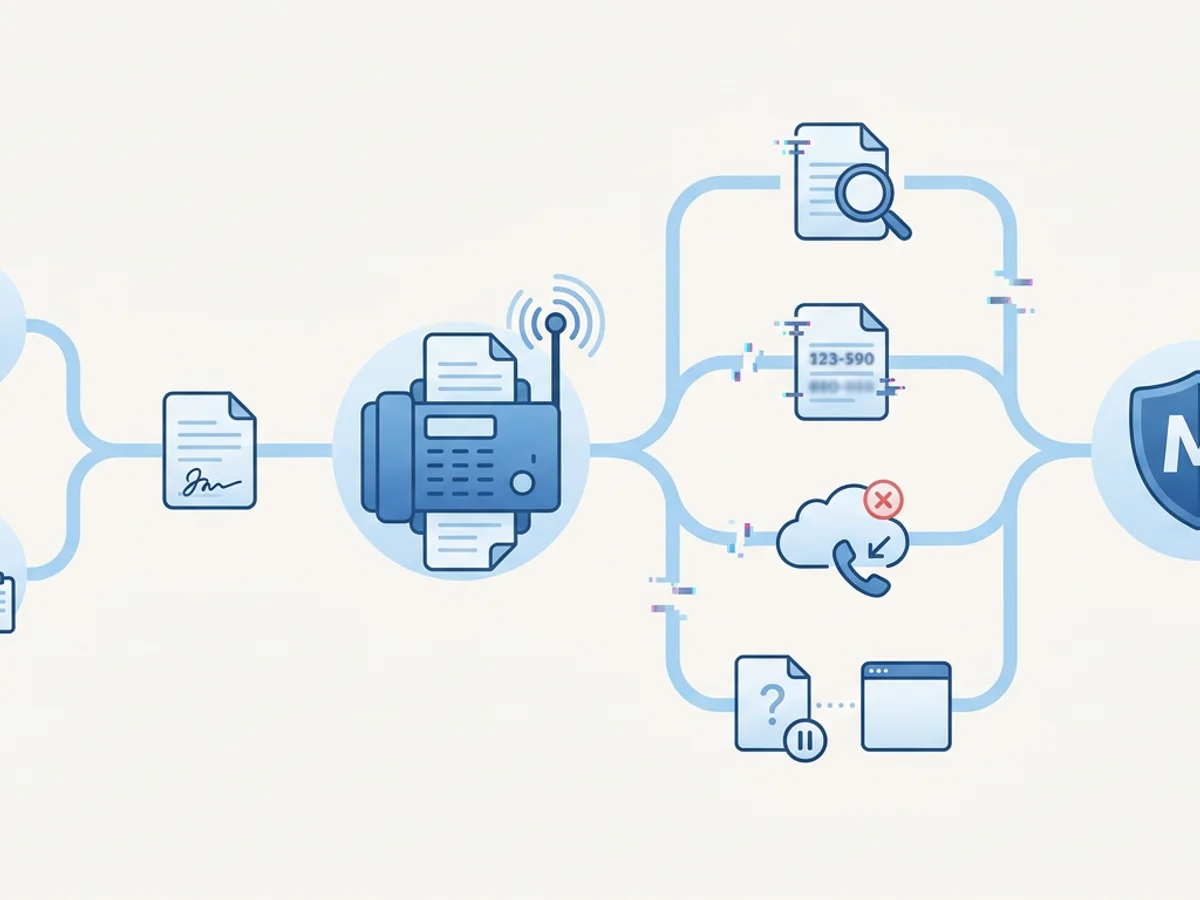
Maybe the Detailed Written Order was missing a date. Maybe the physician’s NPI was hard to read. Maybe the supplier documentation team sent the order to an outdated fax number. Or maybe the fax technically went through, but nobody saved the confirmation page — and now Medicare review is asking for proof that the document was sent on time.
For prosthetics clinics, these small fax and documentation gaps can turn into real reimbursement delays. The clinical work may be excellent, but Medicare claims for prosthetic devices depend heavily on documentation discipline: correct order, correct signatures, correct dates, correct supporting records, and a traceable transmission process.
Fax is still a common part of that process. The key is not just “sending a fax.” It is sending the right packet, to the right destination, with a confirmation record your team can retrieve later.
Below is a practical workflow for faxing Detailed Written Orders and related documentation more reliably — with fewer avoidable delays.
Start with the Medicare Documentation Risk Points
Before improving your fax process, it helps to understand where delays usually begin. In prosthetics, Medicare-related documentation often involves multiple parties: the prosthetist, ordering physician, referring provider, billing team, and sometimes a hospital or rehab facility. Any handoff can introduce friction.
A typical prosthetics documentation packet may include:
- The Detailed Written Order or Standard Written Order, depending on the item and payer requirement
- Physician signature and date
- Beneficiary information
- Practitioner notes and evaluation documentation
- Medical necessity documentation
- Diagnosis information
- Prosthetic device description, codes, or component details
- Delivery documentation, when applicable
- Prior authorization or review-related records, if required
The exact requirements depend on the device, payer rules, and current Medicare guidance. Clinics should always follow the applicable Local Coverage Determination, Policy Article, Medicare manuals, and any instructions from their billing or compliance advisors.
That said, many delays are not caused by complex coverage issues. They are caused by basic process failures:
- Sending an unsigned or undated order
- Faxing the wrong version of the document
- Missing the physician’s printed name or credentials
- Using a stale fax number from an old referral record
- Sending pages out of order
- Forgetting a cover page that identifies the patient and request
- Failing to keep a delivery receipt
- Resending documents without noting what changed
A better fax workflow cannot fix an incomplete medical record, but it can reduce preventable administrative errors that slow down claim submission, physician follow-up, or additional documentation requests.
Build a Fax Packet That Is Easy to Review
Think about the person on the receiving end: a physician’s office, a hospital discharge planner, a billing reviewer, or an internal documentation specialist. If the fax packet is difficult to interpret, it may sit in a queue or get routed incorrectly.
A strong prosthetics fax packet is organized, labeled, and easy to act on.
Use a clear cover page
A professional fax cover page should answer the recipient’s first questions immediately:
- Who is sending this?
- Who is the intended recipient?
- What patient is this about?
- What action is needed?
- How urgent is it?
- Who should be contacted with questions?
For example:
Re: Detailed Written Order for left transtibial prosthesis
Action requested: Physician signature and date required on page 2
Patient: [Name], DOB: [Date]
Return fax: [Clinic fax number]
Questions: [Staff member], [Phone]
Be careful not to overload the cover page. It should route the packet and state the needed action, not replace the documentation itself.
BestFax.com includes professional fax cover pages, which can help clinics avoid sending bare documents with no routing context. That may sound minor, but a clear cover page often determines whether the order reaches the right staff member the first time.
Put the most important document first
If the recipient needs to sign the Detailed Written Order, place that document near the front — usually immediately after the cover page. Supporting notes can follow.
A practical order might be:
- Fax cover page
- Detailed Written Order or required order form
- Prosthetist evaluation or relevant clinic note
- Physician documentation request instructions, if needed
- Supporting medical necessity documentation
- Any payer-specific checklist or prior authorization reference
If your clinic uses a documentation checklist, include it internally before faxing or as a final page when useful. Just make sure the recipient is not confused about what requires action.
Name files before uploading
When your team sends files from a browser-based fax tool, clean filenames reduce mistakes. Instead of uploading “scan1234.pdf,” use a naming pattern such as:
Smith_Jane_DWO_TTProsthesis_2026-02-14.pdfGarcia_MedNecNotes_AKSocketReplacement.pdfLee_PhysicianSignatureRequest_DWO.pdf
This helps staff choose the correct document before sending and makes it easier to save copies in your records afterward.
The service supports PDF, Word, and image file uploads, which is useful because prosthetics offices often receive documentation in mixed formats from referral sources, scanners, and internal templates. Whenever possible, combine pages into a single PDF before faxing so the receiving office gets one coherent packet.
Confirm Before You Send: A Five-Minute Pre-Fax Check
The fastest fax is not the one sent immediately. It is the one that does not have to be corrected tomorrow.
Before transmitting a Detailed Written Order, have the sender pause for a short verification step. This can be done by billing staff, the practitioner’s assistant, or whoever owns documentation follow-up.
A simple pre-fax check might include:
Patient identifiers
Confirm that the patient’s name, date of birth, and Medicare or account reference information match across the order and supporting records.
Device description
Check that the order clearly describes the prosthetic device or component being ordered. If your clinic uses HCPCS codes on internal documents, make sure they align with the written description and current billing plan.
Physician information
Verify the recipient’s name, clinic, fax number, and role. For orders requiring physician completion, confirm that the fax is going to the office or department that actually handles signatures.
Signature and date fields
If the document is being sent for signature, highlight or otherwise clearly indicate where the physician must sign and date. If it is already signed, confirm the signature and date are legible.
Page count
Compare the number of pages in the document with the expected fax page count. Missing pages are a common cause of repeated faxes.
Return instructions
Make sure the cover page says how the signed order should be returned. Include the return fax number and a phone number for questions.
This review does not need to become bureaucratic. A laminated checklist near the scanner, a shared internal note, or a short EHR task template may be enough. The point is to prevent the common errors that create Medicare documentation delays later.
Use Browser-Based Faxing When the Clinic Is Not Near the Fax Machine
Prosthetics work does not always happen at a front desk. Practitioners may be in patient rooms, hospitals, skilled nursing facilities, rehab centers, or satellite offices. Documentation staff may be remote for part of the week. A physician may call back asking for a corrected page while the person who prepared the order is away from the office.
That is where browser-based faxing can be useful. BestFax.com lets users send and receive faxes from any web browser on a phone, tablet, or computer. It works in Safari, Chrome, Firefox, and Edge, with no app download required.
Consider a few realistic situations:
- A prosthetist at a hospital needs to send a revised order request to the referring physician before discharge planning changes.
- A billing coordinator working from a tablet needs to resend a missing page after a physician’s office says page three did not arrive.
- A clinic manager at a satellite location receives a signed order and needs to forward it to the main billing office.
- A front-office staff member needs to fax documentation before leaving for the day, but the shared machine is tied up or producing poor scans.
In those cases, online faxing can reduce dependence on a single physical fax machine. Staff can upload the correct PDF, Word document, or image file from the browser and send it without waiting for access to office hardware.
Security still matters. The service uses TLS encryption for fax transmissions. It does not offer a BAA or healthcare-specific compliance certification, so each clinic should evaluate whether and how the tool fits its internal privacy, payer, and compliance policies before using it for patient-related documents.
That honest review is important. Convenience should never replace your organization’s documentation and privacy requirements.
Save Proof: Confirmation Receipts Are Part of the Documentation Trail
One of the most overlooked parts of faxing is what happens after the transmission. For Medicare documentation, a fax confirmation can be more than an operational convenience. It may help show when a document was transmitted, where it was sent, and whether the transmission was reported as successful.
Fax confirmation and delivery receipts are provided through this tool. Clinics should decide where those receipts live in their workflow.
A strong recordkeeping habit might look like this:
- Send the DWO packet to the physician’s office.
- Download or save the delivery receipt.
- Store the receipt with the patient’s documentation record or billing work queue.
- Add a note: “DWO faxed to Dr. Patel’s office at [fax number] on [date]. Confirmation received.”
- Set a follow-up task for 24–48 hours if a signature is needed.
This gives your team a cleaner audit trail than relying on memory or a paper confirmation sheet that may be misplaced.
For resends, do not simply transmit the same packet again without context. Add a note on the cover page, such as:
Second request — original fax sent [date]. Please sign and return page 2.
If the document changed, say so clearly:
Updated order attached — please use this version and disregard prior version sent [date].
Version confusion is a real source of delays. A physician may sign an outdated form, billing may submit based on an older description, or staff may file the wrong copy. Clear cover-page language helps prevent those problems.
Common Fax Mistakes That Delay Prosthetics Claims
Even organized clinics can fall into patterns that create avoidable rework. Watch for these common issues.
Sending documentation too late in the workflow
Do not wait until the claim is almost ready to submit before discovering that the written order is incomplete. Fax signature requests as soon as the required order is prepared and the clinical documentation supports the need.
Assuming “sent” means “received and handled”
A successful fax receipt does not mean the physician signed the order or that the office routed it correctly. It only confirms transmission status. Pair receipts with follow-up tasks.
Using one generic cover page for every situation
A cover page that says only “Please see attached” is not enough when a signature, correction, or medical necessity note is needed. State the exact action requested.
Faxing oversized packets without organization
If a physician only needs to sign one page, do not bury that page behind 30 pages of notes unless the full packet is required. When supporting documentation is necessary, place the action page first and label the packet clearly.
Failing to verify fax numbers
Physician groups merge, departments move, and referral records go stale. If a fax number has not been used recently, confirm it before sending sensitive or time-critical documentation.
Not tracking returned orders
The outgoing fax is only half the process. Create a clear status list for orders awaiting return: patient name, physician office, date sent, follow-up date, and staff owner.
A Practical Same-Day Workflow for DWO Faxing
For many prosthetics clinics, the goal is simple: send complete orders the same day they are ready, follow up quickly, and keep receipts.
Here is a workable process:
Morning: Documentation coordinator reviews new prosthetic evaluations and identifies orders needing physician action.
Late morning: Staff prepares DWO packets, verifies patient identifiers, checks device descriptions, and confirms fax numbers.
Midday: Orders are faxed with specific cover-page instructions. Delivery receipts are saved to the appropriate record or billing queue.
Afternoon: Staff checks for returned signed orders and updates the tracking list.
Next business day: Any unsigned orders are followed up by phone or resend, with a cover page noting the prior transmission date.
This rhythm helps prevent orders from drifting for days. It also gives practitioners and billing staff better visibility into what is missing before Medicare submission timelines become stressful.
BestFax.com is priced at $4.95 one-time per fax or $10/month with a subscription. For a clinic that only occasionally needs browser-based faxing, per-fax pricing may make sense. For teams that fax regularly, the monthly option may be easier to plan around. There is no free trial, so clinics should choose based on expected use.
Keep the Focus on Clean Documentation, Not Just Faster Faxing
The real objective is not to send more faxes. It is to move medically necessary prosthetic care through the documentation process with fewer preventable delays.
That means:
- Preparing complete orders before sending
- Using clear cover pages
- Confirming fax numbers
- Organizing packets so recipients know what to do
- Saving delivery receipts
- Tracking outstanding signatures
- Following applicable Medicare and payer documentation rules
Browser-based faxing can support that workflow when staff need a flexible way to send or receive documents from a web browser. But the technology works best when paired with disciplined internal review.
If your clinic is still relying on a single machine, loose paper confirmation sheets, or undocumented resends, a more structured fax process may reduce confusion and help your team respond faster when documentation questions come up.
Send your first fax at BestFax.com.
Related Posts
How Pharmacies Can Fax Controlled Substance Transfer Forms Without Fill Delays
Practical fax workflow tips for pharmacies sending controlled substance transfer forms, from clean documents to delivery receipts.

How ENT Clinics Fax Allergy Serum Orders Without Mixing Delays
Practical steps ENT clinics can use to fax allergy serum orders clearly, confirm delivery, and reduce lab mixing delays.
How Mobile X-Ray Providers Can Fax STAT Reports to Nursing Homes Without Delays
Practical ways mobile X-ray providers can fax STAT reports to nursing homes faster, with fewer routing delays and clearer delivery tracking.